Update: This version of the django informix backend only works with Django pre 1.0 due to changes in Django database api. I have created a version that is known to work with Django 1.1+ and it's code can be found at: http://code.google.com/p/django-informix/
At work I needed to quickly be able to publish some technical bulletins on the web and provide a web interface for addition of new content. In the past we have used Zope for most of our in-house web development but I wanted the content stored in a "real" database. This meant deciding on a Python Web Framework that used a RDBMS out of the box. Part of the reason for selecting Django over the others, was the built-in database admin interface which meant one less set of controllers and views to develop.
Initial development was done using a SQLite backend and I had a working application deployed under lighty and fastcgi in just under a day. During this time I was also learning the framework so very impressed with the productivity. Of course good documentation and Google helped.
At work we deploy our applications on IBM Informix, Oracle and MS SQL Server databases, but for development and in-house projects use Informix. So I really needed a Django database adaptor for Informix. This would be my fourth Informix DA for a python project as I have written them for Zope2/3, and SQLObject. Writing the DA wasn't too hard but I had to do some interesting things with regular expressions to allow datetimes to work correctly and to remove some unsupported SQL syntax from the Django ORM created DDL. Also handling of TEXT data types is abit of a hack until I get a chance to re-factor the code. So if you are one of the few people in the world that still use Informix and want to use it with Django, I have put the code here. Due to Django's ORM, using some long table names you will have to use either Informix IDS 9 or 10.
Tuesday, August 29, 2006

Thursday, August 17, 2006
IronPython 1.0 RC2 released
The Dynamic Languages team at Microsoft today released IronPython 1.0 RC2. I know what I will be testing for the next couple of nights. If no major issues found, looks like a final release in 2 weeks.
Monday, August 14, 2006
Deploying the GDATA Reader as an executable
Now that we have a working GDATA reader, it would be nice to make it into a CLI executable. IronPython provides a couple of ways to do this. The IronPython console application ipy.exe has an extension switch called SaveAssemblies. This will save the main Python script and any imported Python file as separate executables of the same basename. This is good if you have a simple single Python program that isn't dependent of other Python modules. Running the following command will create a gdatareader.exe in the same directory as the Python program.
You just need to provide the list of Python files and the name of the executable to be generated.
If you provide more than one Python file, the first file must contain the main logic. If the main logic is activated as follows:
this will need to be modified as the __name__ variable is set to the name of the executable without the .exe extension. The following works for me:
Modified versions of the GDATA reader scripts from the previous post are available. gdatareader.py gdatareaderrtf.py
ipy.exe -X:SaveAssemblies gdatareader.pyIt has a limitation that it will display a console window as well as the application when you run it. Also the IronPython team do not recommend it as the best way to create an executable. They recommend using the IronPython.Hosting.PythonCompiler class. I have created a simple Python script makeexe.py that uses this class to compile one or more Python files into a CLI executable. The executable is created as a true Windows application so there is no console. For both these methods, the created executable requires the gdata.dll, IronPython.dll and IronMath.dll assemblies in the same directory or in the GAC.
import sys
from IronPython.Hosting import PythonCompiler
from System.Reflection.Emit import PEFileKinds

from System.Collections.Generic import List
sources = List[str]()

for file in sys.argv[1:-1]:
    sources.Add(file)
    exename = sys.argv[-1]

compiler = PythonCompiler(sources, exename)
compiler.MainFile = sys.argv[1]
compiler.TargetKind = PEFileKinds.WindowApplication
compiler.IncludeDebugInformation = False
compiler.Compile()
You just need to provide the list of Python files and the name of the executable to be generated.
ipy.exe makeexe.py gdatareader.py gdatareader.exe
If you provide more than one Python file, the first file must contain the main logic. If the main logic is activated as follows:
if __name__ == "__main__":
this will need to be modified as the __name__ variable is set to the name of the executable without the .exe extension. The following works for me:
if __name __ == "__main__" or __name__ == sys.executable:
Modified versions of the GDATA reader scripts from the previous post are available. gdatareader.py gdatareaderrtf.py
Saturday, August 12, 2006
A Windows.Forms GUI for the GDATA Reader using IronPython
This is the second coding entry in a series of posts about using IronPython to develop a GDATA reader.
The purpose of this post is show how to add a GUI to the simple GDATA reader IronPython script I created in a previous post using System.Windows.Forms. It will not be an in depth discussion on how things work within Windows Forms. For a more detailed introduction to Windows Forms and IronPython, see Michael Foords excellent series of posts.
I suggest you open the source for the complete script in another browser window before continuing.
For the GUI we need a form and on the form, a textbox widget to enter the GDATA URI, a multi-line textbox widget to display the title and summary of each returned feed entry or any errors, a statusbar, and a button to re-fetch the feed.
To the original gdatareader.py script, we add references to the System.Windows.Forms and System.Drawing assemblies and import them.
Next we create a form class called GDataReaderForm.To design the form, I find it's easier to use the GUI Form Designer in Visual Studio 2003/2005 or Visual C# Express. I then copy the generated C# code for the form and with a couple of minutes of search/replace ( this to self, remove those pesky semi-colons and casts) and reformatting, I have the Python code to display my form. This is the _initgui method in the GDataReaderForm class.
Rather than explaining every widget property, I will just point out the things that I had to spend some effort on to get things to work.
Attached to the Click event of the Refresh button is the method GdataLoadFeed.
So when the Enter key is pressed or the Refresh button clicked, GdataLoadFeed is called, which inturn calls load_feed which finally calls parse the function created in the previous post to fetch and parse a GDATA feed. A list of entries is returned, formatted and displayed in the textbox.
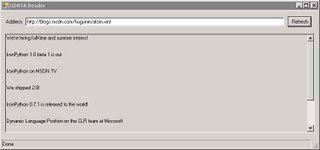
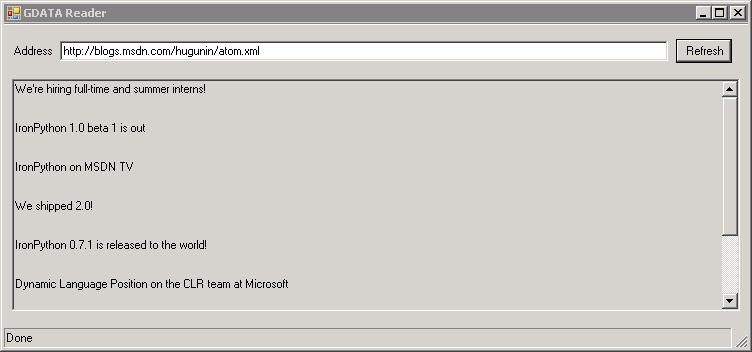
The following screenshot shows the completed GUI displaying the Atom 1.0 feed from Jim Hugunin's blog running under Windows 2003 Terminal Server client (which explains the lack of a XP theme). The Atom feeds from blogs.msdn.com do not have a summary element so our script displays a blank line.
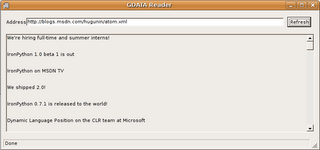
And the next screenshot is the same code running the GUI on Ubuntu 6.06 LTS with Mono 1.1.16.1.
Improving the feed display with a RTF Textbox
Since a GDATA entry contains a link element it would be useful if it was displayed and a user could activate the link to view the entry content in a browser. Some more investigation of the gdata.dll was required to discover how to identify and access the link. The following function does the job for the GDATA reader:
The full source can be found here. The following screenshot shows the completed GUI with RichTextBox displaying the Atom 1.0 feed under Windows 2003 Terminal Server.
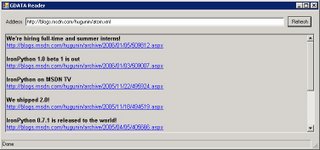
The functionality of the RichTextBox widget with the current Mono version of Windows.Forms means that the text formatting is not the same as .NET and the URL's are displayed but are not clickable. Hopefully this will be fixed soon.
The GUI is missing a couple of features like a top menu and About dialog, maybe that's something for another post.
In the next post we will compile the program into a CLI executable.
The purpose of this post is show how to add a GUI to the simple GDATA reader IronPython script I created in a previous post using System.Windows.Forms. It will not be an in depth discussion on how things work within Windows Forms. For a more detailed introduction to Windows Forms and IronPython, see Michael Foords excellent series of posts.
I suggest you open the source for the complete script in another browser window before continuing.
For the GUI we need a form and on the form, a textbox widget to enter the GDATA URI, a multi-line textbox widget to display the title and summary of each returned feed entry or any errors, a statusbar, and a button to re-fetch the feed.
To the original gdatareader.py script, we add references to the System.Windows.Forms and System.Drawing assemblies and import them.
Next we create a form class called GDataReaderForm.To design the form, I find it's easier to use the GUI Form Designer in Visual Studio 2003/2005 or Visual C# Express. I then copy the generated C# code for the form and with a couple of minutes of search/replace ( this to self, remove those pesky semi-colons and casts) and reformatting, I have the Python code to display my form. This is the _initgui method in the GDataReaderForm class.
Rather than explaining every widget property, I will just point out the things that I had to spend some effort on to get things to work.
- If the form is resized, we want the widgets to scale in relation to the re-sizing, so you need to set the Anchor property.
- If the Enter key is pressed, we want the program to fetch the URI, you need to set the AcceptsReturn property of the URI textbox to false. This means the Enter key with then activate the default button for the form. To make the Refresh button the default button, you need to set the AcceptButton property of the form.
self.AcceptButton = self.gdataRefreshButtonAttached to the Click event of the Refresh button is the method GdataLoadFeed.
self.gdataRefreshButton.Click += self.GdataLoadFeedSo when the Enter key is pressed or the Refresh button clicked, GdataLoadFeed is called, which inturn calls load_feed which finally calls parse the function created in the previous post to fetch and parse a GDATA feed. A list of entries is returned, formatted and displayed in the textbox.
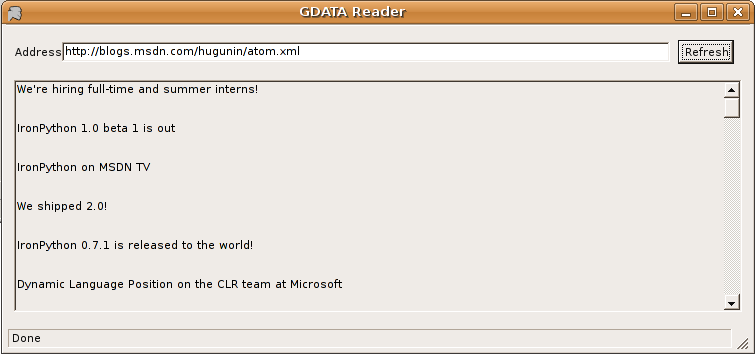
The following screenshot shows the completed GUI displaying the Atom 1.0 feed from Jim Hugunin's blog running under Windows 2003 Terminal Server client (which explains the lack of a XP theme). The Atom feeds from blogs.msdn.com do not have a summary element so our script displays a blank line.
And the next screenshot is the same code running the GUI on Ubuntu 6.06 LTS with Mono 1.1.16.1.
Improving the feed display with a RTF Textbox
Since a GDATA entry contains a link element it would be useful if it was displayed and a user could activate the link to view the entry content in a browser. Some more investigation of the gdata.dll was required to discover how to identify and access the link. The following function does the job for the GDATA reader:
I discovered a RichTextBox widget will detect any urls in it's text if the DetectUrls property is set to true. So the the feed display TextBox was replaced with a RichTextBox, and the formatting function for the entry display replaced with a function that created RTF text. To handle a link being clicked the LinkClick event must have a function assigned to it.
def GetRelatedUri(self, entry, reltype="alternate"):
'''
Get the related uri of reltype from the GDATA entry Links collection.
Returns Uri or None if not found.
'''
uri = None
for link in entry.Links:
    if hasattr(link, "Rel"):
        if link.Rel == reltype:
            uri = link.HRef.Content
    else:
        if reltype == "alternate":
            # No Rel attribute means it's alternate
            uri = link.HRef.Content
    return uri
self.gdataEntriesRichTextBox.LinkClicked += self.LinkClicked
The code for the event handler:
def LinkClicked(self, sender, args):
'''
Get OS to launch the link using associated application
'''
 System.Diagnostics.Process.Start(args.LinkText)
The full source can be found here. The following screenshot shows the completed GUI with RichTextBox displaying the Atom 1.0 feed under Windows 2003 Terminal Server.
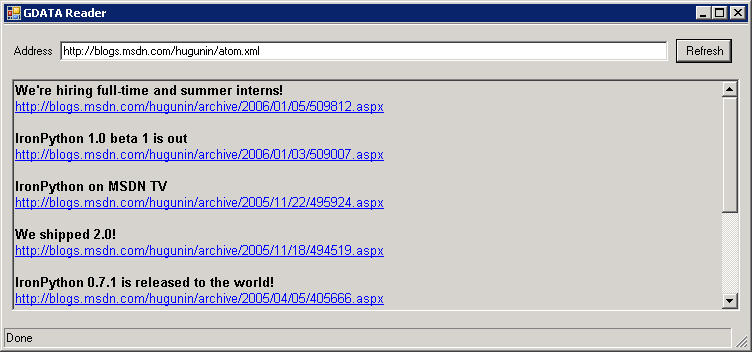
The functionality of the RichTextBox widget with the current Mono version of Windows.Forms means that the text formatting is not the same as .NET and the URL's are displayed but are not clickable. Hopefully this will be fixed soon.
The GUI is missing a couple of features like a top menu and About dialog, maybe that's something for another post.
In the next post we will compile the program into a CLI executable.
Friday, August 11, 2006
My OSDC 2006 Paper Proposal Accepted
My paper proposal "Development of Mono Applications with Agile Languages" has been accepted for this years Open Source Developers Conference in Melbourne. There are 15 proposals for the Python stream, and lots of others. The accepted proposals for the conference can be viewed here. Great to see that Alan and Andy will be presenting as well.
So if you are into Open Source, want to spend time with like minded individuals and expand your mind, see you in Melbourne 6-8 December 2006. This will be my third year of attendance and I can highly recommend it.

So if you are into Open Source, want to spend time with like minded individuals and expand your mind, see you in Melbourne 6-8 December 2006. This will be my third year of attendance and I can highly recommend it.
My CLI and IronPython Development Environment
Someone asked me what my preferred development environment for doing CLI and IronPython work is. Since I want to use IronPython to develop cross-platform apps, my operating system is Ubuntu 6.06 LTS Linux running Mono 1.1.16.1. I normally have a couple of versions of IronPython installed, as of today it is 1.0 beta 9 and RC1. For editting I alternate between Vim 6.4 and the MonoDevelop 0.11 editor. To test my IronPython applications under Windows and to do graphical debugging, I either run Windows XP inside VMPlayer or access a Windows Terminal Server using the Linux Terminal Server Client. And of course I have CPython 2.4 installed to compare with the IronPython implementation and access the standard library.

Tuesday, August 01, 2006
Agile investigation of the GDATA client with IronPython
Updated 13 May 2007 - Modified for new location and packaging of GData libraries.
This is the first coding entry in a series of posts about using IronPython to develop a GDATA reader. You will need to have IronPython RC1 or better installed, and either .NET 2.0 or Mono 1.1.16.1+ installed.
Download the Google GDATA client and unarchive the contents.
Find Google.GData.Client.dll and copy it to the directory you will using for this project.
One of the powerful things you gain from using a dynamic interpreted language for software development is the ability to discover, try and test ideas without the dreaded edit, compile, and debug cycle. To do this we change to the directory with gdata.dll and launch an IronPython interactive console.
If you are using Mono, the command is:
The -X switches are not required but I find they make my life a little easier.
Now we have a console running let's load the Google GDATA client assembly
To load a non-standard assembly, I need to tell IronPython about it. This is done by importing the the clr module and calling the AddReference method. Now that IronPython knows about the GDATA assembly, I can import from it the Python way. From the API docs, I know the namespace.
This loads the client class with an alias of GDClient so I can save some keystrokes. Now we can inspect the class using some Python introspection tools.
Based on my reading of the API docs, I am interested in the Service and FeedQuery classes.
Using dir we are able to see the methods and properties of the Google.GData.Client Service and FeedQuery classes have. Another nice feature is .NET classes imported under IronPython have an auto-generated __doc__ property that shows the overloaded constructors for the class.
Now we can try to read a GDATA feed. So we need a website with a feed that is Atom 1.0 compliant, for this example we will use http://feedparser.org/docs/examples/atom10.xml
Since the Uri property of FeedQuery requires a .NET Uri type, we must import the CLR System module.
Now we can read the GDATA feed and iterate over the returned entries.
Based on this investigation of the GDATA client we can now create a simple python script to read a feed (Download).
Then run it from the commandline
Hopefully this post has given you an insight in how IronPython can help with .NET/Mono software development. In the next post we will give the GDATA reader a GUI to make it more useful.
This is the first coding entry in a series of posts about using IronPython to develop a GDATA reader. You will need to have IronPython RC1 or better installed, and either .NET 2.0 or Mono 1.1.16.1+ installed.
Download the Google GDATA client and unarchive the contents.
Find Google.GData.Client.dll and copy it to the directory you will using for this project.
One of the powerful things you gain from using a dynamic interpreted language for software development is the ability to discover, try and test ideas without the dreaded edit, compile, and debug cycle. To do this we change to the directory with gdata.dll and launch an IronPython interactive console.
ipy.exe -X:TabCompletion -X:ColorfulConsole -X:ExceptionDetailIf you are using Mono, the command is:
mono ipy.exe -X:TabCompletion -X:ColorfulConsole -X:ExceptionDetailThe -X switches are not required but I find they make my life a little easier.
Now we have a console running let's load the Google GDATA client assembly
IronPython 1.0.60725 on .NET 2.0.50727.42
Copyright (c) Microsoft Corporation. All rights reserved.
>>> import clr
>>> clr.AddReference("Google.GData.Client.dll")
To load a non-standard assembly, I need to tell IronPython about it. This is done by importing the the clr module and calling the AddReference method. Now that IronPython knows about the GDATA assembly, I can import from it the Python way. From the API docs, I know the namespace.
>>> import Google.GData.Client as GDClientThis loads the client class with an alias of GDClient so I can save some keystrokes. Now we can inspect the class using some Python introspection tools.
>>> dir(GDClient)
['AlternativeFormat', 'AtomBase', 'AtomBaseLink', 'AtomBaseLinkConverter', 'AtomCategory', 'AtomCategoryCollection', 'AtomContent', 'AtomContentConverter', 'AtomEntry', 'AtomEntryCollection', 'AtomEntryConverter', 'AtomFeed', 'AtomFeedParser', 'AtomGenerator', 'AtomGeneratorConverter', 'AtomIcon', 'AtomId', 'AtomLink', 'AtomLinkCollection', 'AtomLogo', 'AtomParserNameTable', 'AtomPerson', 'AtomPersonCollection', 'AtomPersonConverter', 'AtomPersonType', 'AtomSource', 'AtomSourceConverter', 'AtomTextConstruct', 'AtomTextConstructConverter', 'AtomTextConstructElementType', 'AtomTextConstructType', 'AtomUri', 'BaseFeedParser', 'BaseIsDirty', 'BaseIsPersistable', 'BaseMarkDirty', 'BaseNameTable', 'ClientFeedException', 'ClientQueryException', 'ExtensionElementEventArgs', 'ExtensionElementEventHandler', 'FeedParserEventArgs', 'FeedParserEventHandler', 'FeedQuery', 'GDataGAuthRequest', 'GDataGAuthRequestFactory', 'GDataLoggingRequest', 'GDataLoggingRequestFactory', 'GDataRequest', 'GDataRequestException', 'GDataRequestFactory', 'GDataRequestType', 'GoogleAuthentication', 'HttpFormPost', 'HttpMethods', 'IBaseWalkerAction', 'IExtensionElement', 'IGDataRequest', 'IGDataRequestFactory', 'IService', 'LoggedException', 'QueryCategory', 'QueryCategoryCollection', 'QueryCategoryOperator', 'RssFeedParser', 'Service', 'TokenCollection', 'Tracing', 'Utilities', '__builtins__', '__dict__', '__name__']
>>>
Based on my reading of the API docs, I am interested in the Service and FeedQuery classes.
>>> dir(GDClient.Service)
['Credentials', 'Delete', 'Equals', 'Finalize', 'GServiceAgent', 'GetHashCode', 'GetType', 'Insert', 'MakeDynamicType', 'MemberwiseClone', 'NewAtomEntry', 'NewExtensionElement', 'OnNewExtensionElement', 'OnParsedNewEntry', 'Query', 'QueryOpenSearchRssDescription', 'Reduce', 'ReferenceEquals', 'RequestFactory', 'StreamInsert', 'ToString', 'Update', '__class__', '__doc__', '__init__', '__module__', '__new__', '__reduce__', '__reduce_ex__', '__repr__', 'add_NewAtomEntry', 'add_NewExtensionElement', 'remove_NewAtomEntry', 'remove_NewExtensionElement']
>>> GDClient.Service.__doc__
'Service()\nService(str applicationName)\nService(str service, str applicationName)\nService(str service, str applicationName, str library)'
>>>GDClient.FeedQuery.Uri.__doc__
'Get: Uri Uri(self)\nSet: Uri(self) = value\n'
Using dir we are able to see the methods and properties of the Google.GData.Client Service and FeedQuery classes have. Another nice feature is .NET classes imported under IronPython have an auto-generated __doc__ property that shows the overloaded constructors for the class.
Now we can try to read a GDATA feed. So we need a website with a feed that is Atom 1.0 compliant, for this example we will use http://feedparser.org/docs/examples/atom10.xml
>>> query = GDClient.FeedQuery()
>>> import System
>>> query.Uri = System.Uri("http://feedparser.org/docs/examples/atom10.xml")
>>> service = GDClient.Service("cl","hexdump-gdatareader-0.1")
>>>
Since the Uri property of FeedQuery requires a .NET Uri type, we must import the CLR System module.
Now we can read the GDATA feed and iterate over the returned entries.
>>> feed = service.Query(query)
>>> for entry in feed.Entries:
...  print entry.Title.Text
...
First entry title
Based on this investigation of the GDATA client we can now create a simple python script to read a feed (Download).
import clr
import System
clr.AddReference("Google.GData.Client.dll")
import Google.GData.Client as GDClient

def parse(uri, nc=None):
 # Create a query and service object
 query = GDClient.FeedQuery()
 service = GDClient.Service("cl","hexdump-gdatareader-0.1")
 query.Uri = System.Uri(uri)
 return service.Query(query)

if __name__ == "__main__":
feed = parse("http://feedparser.org/docs/examples/atom10.xml")
for entry in feed.Entries:
    print entry.Title.Text,":",entry.Summary.Text
Then run it from the commandline
ipy.exe gdatareader.py
First entry title:Watch out for nasty tricks
Hopefully this post has given you an insight in how IronPython can help with .NET/Mono software development. In the next post we will give the GDATA reader a GUI to make it more useful.
Confessions of a part-time IronPython programmer
On the 27 july 2006 I gave a talk to the the Sydney Python Group (SyPy) about my experiences using IronPython on both .NET and Mono. I promised some people who couldn't attend that I would do a post on my blog that presented the same material. I have decided to present this material as a series of posts, with this post being the index to them.
Index of posts
Three months ago, I started trying to do "real" things with IronPython and I was disappointed with the results. This is because of my expectation that it would work like CPython and I would have access to the wonderful standard library. This is why people refer to Python as a language with batteries included. At the time dependant on your viewpoint, IronPython had only partially charged batteries and worst case batteries were not included. Yes, you could copy or link the CPython standard library so IronPython could use it, but of course modules that used C extensions will not work. Lot's of my favorite non-standard python modules are very dependant on the Python standard library. You would be surprised how many needed md5.py, and if you want to use Python's high level network libraries like urllib, httplib etc you need socket.py.
But it got better
As I said, this was a few months ago and things have improved, thanks to the IronPython team providing some standard library replacements written in C# and the community providing python wrappers round .NET classes. I also had my eureka moment where I discovered I had a good library at my disposal, the base and extension classes that both .NET and Mono provide.
So lets see what we can do with IronPython.
Requirements
We need something to build, so for the first series of posts we are going to create a quick and dirty GDATA reader. What is GDATA? From Google's website:
"The Google data APIs ("GData" for short) provide a simple standard protocol for reading and writing data on the web. GData combines common XML-based syndication formats (Atom and RSS) with a feed-publishing system based on the Atom publishing protocol, plus some extensions for handling queries."
Also Google provides a GDATA client written in C# as source and an assembly. We will use this client assembly as a helper module in our project. Three posts will document the steps in creating the GDATA reader.
Index of posts
- Agile investigation of the GDATA client with IronPython
- A Windows Form GUI for the GDATA reader with IronPython
- Deploying the GDATA Reader as an executable
- IronPython and ADO.Net Part 1
- IronPython and ADO.Net Part 2
- I have been programming in Python since 1997.
- Python is my favorite programming language.
- We use it at work as our cross platform scripting language and for most network/web work.
- I have played with IronPython since Jim Hugunin did the first public release and have experimented with most of the releases that have come from the Microsoft Dynamic Languages IronPython Team.
- Hope that IronPython will give me the same programming flexibility that the Mark Hammond's CPython win32 extensions gave me. But I want it on all platforms that support .NET and Mono.
Three months ago, I started trying to do "real" things with IronPython and I was disappointed with the results. This is because of my expectation that it would work like CPython and I would have access to the wonderful standard library. This is why people refer to Python as a language with batteries included. At the time dependant on your viewpoint, IronPython had only partially charged batteries and worst case batteries were not included. Yes, you could copy or link the CPython standard library so IronPython could use it, but of course modules that used C extensions will not work. Lot's of my favorite non-standard python modules are very dependant on the Python standard library. You would be surprised how many needed md5.py, and if you want to use Python's high level network libraries like urllib, httplib etc you need socket.py.
But it got better
As I said, this was a few months ago and things have improved, thanks to the IronPython team providing some standard library replacements written in C# and the community providing python wrappers round .NET classes. I also had my eureka moment where I discovered I had a good library at my disposal, the base and extension classes that both .NET and Mono provide.
So lets see what we can do with IronPython.
Requirements
- IronPython - At the time of writing this it is at RC1. The latest version can be downloaded from here.
- .NET 2.0 or Mono 1.1.16.1+
- Your favorite text editor
- And you may find an IDE like Visual Studio 2005, Visual Express C#, SharpDevelop or MonoDevelop helpful.
We need something to build, so for the first series of posts we are going to create a quick and dirty GDATA reader. What is GDATA? From Google's website:
"The Google data APIs ("GData" for short) provide a simple standard protocol for reading and writing data on the web. GData combines common XML-based syndication formats (Atom and RSS) with a feed-publishing system based on the Atom publishing protocol, plus some extensions for handling queries."
Also Google provides a GDATA client written in C# as source and an assembly. We will use this client assembly as a helper module in our project. Three posts will document the steps in creating the GDATA reader.
- Agile investigation of the GDATA client with IronPython
- A Windows.Forms GUI for the GDATA reader using IronPython
- Deploying the GDATA reader as an executable
- Embedding IronPython
- Database access with IronPython
- IronPython and the Web.
Wednesday, July 26, 2006
IronPython 1.0 RC1 released
It was announced on the IronPython mailinglist today, that the first release candiate of IronPython 1.0 is available for download. IronPython is an implementation of Python written in C# and designed to run on an implementation of CLI like Microsoft .NET 2.0 CLR or Mono 1.1.16.1+. The goal of the IronPython team is for 1.0 is to be compatible with CPython 2.4. But they have included some features from CPython 2.5 that are enabled with the -X:Python25 commandline switch. These include PEP 308: Conditional Expressions and PEP 343: 'with' statement.
As well as many bugfixes, the other positives for me are:
As well as many bugfixes, the other positives for me are:
- In some cases code execution is faster, and it launches 2.5 times faster.
- Since I do alot of my IronPython work with Mono, I can now finally exit using Control-D
Tuesday, July 18, 2006
Overriding IronPython's built-in modules
For those who haven't used IronPython, batteries are not included. After installing IronPython, you need to copy, symbolic link or update sys.path with the CPython standard libs if you want to do more than script .NET/Mono classes. As the various beta's of IronPython have been released, some of the standard library modules are being coded in C# and included in the IronPython Assembly. The socket module is one of these. But as of Beta 9, the socket module does not implement the getaddrinfo function. Many Python network modules expect this function and I was having trouble with a script I was trying to port because of it. But I knew that Seo Sanghyeon had written a IronPython socket module prior to it being included as a built-in and it had getaddrinfo. Since the calls to socket were in other third party python modules, I couldn't just rename socket.py and import it the new name. I needed to override the built-in but how? Then I remembered a post by Fuzzyman about including Python code in an assembly. So by using the code in the top of my script I was able to use the python version of socket.
Of course, there may be a better way.
import imp
import sys

moduleName = 'socket'
moduleSource = './Lib.ip/socket.py'
newModule = imp.new_module(moduleName)
execfile(moduleSource, newModule.__dict__)
sys.modules[moduleName] = newModule

import socket
Of course, there may be a better way.
SyPy Meetup Reminder Thursday 27 July
The Sydney Python group is having its first meeting for the year on Thursday July 27.
Usual time and new place:
Thursday, July 27, 2006 (6:30 PM - 8:30 PM)
The "new" University of Sydney School of IT Building.
Thanks to Bob Kummerfeld for arranging this.
The venue is approx 1 km from both Central and Redfern stations.
Use the entrance from the University side, not the Cleveland St side. If you come from City Rd, enter the Seymour Centre forecourt and follow the curve of the new building down to the foyer entrance.
http://www.cs.usyd.edu.au/~dasymond/index.cgi?p=Map
Please reply to this message (or click the appropriate radio button on http://upcoming.org/event/89388) if you will be coming.
Talks:
Graham Dumpeton on what is coming in the next major version of mod_python (3.3). This version of mod_python should represent a significant improvement over previous versions in certain areas with ramifications on stability. New features have also been added which make mod_python a bit more flexible than it is now and more useable in the way that Apache modules should be able to be used. Result is that mod_python can truly be used for more than just a jumping off point for stuff like WSGI and all those Python web frameworks that
keep popping up every day.
I will be giving a talk on my experiences in using IronPython with .NET and Mono.
The talks will be 15-20 minutes in length with plenty of time for questions.
Monday, July 17, 2006
IronPython and the moving API
Last week the IronPython team released IronPython .0 beta 9. This should be the last beta before the release candiate. Also they say they have finally locked down the Hosting API. This has an impact on what I have been working on, which involves hosting the interpreter within an ASP.NET handler. Thankfully the final Hosting API has returned to a more pythonic API rather than imho, the ugly API of beta 8.
With each beta release, there seem to be just enough changes in how to do things that writing an article on IronPython that will work with later beta's is a challenge. Even the IronPython team have been having trouble keeping their tutorials that ship with the beta in sync.
For example, on the IronPython mailinglist, Michael Foord pointed out a link to an article on IronPython. It is well written and has some interesting code examples that could attract a .NET programmer to give IronPython a go. I am not sure when the article was written but at least one code example doesn't work as a python list is no longer automatically converted to an array when passed as a argument to a .NET class. So to get this example to work for beta 9:
You need to modify the line:
You will also need to add
The author of the article provides the above syntax as an alternative solution, but as of beta 9 it's the only solution. I can understand why these changes have needed to happen so late in the beta programme, but it's a shame we miss a chance to bring more programmers under the spell of Python because the code didn't work.
With each beta release, there seem to be just enough changes in how to do things that writing an article on IronPython that will work with later beta's is a challenge. Even the IronPython team have been having trouble keeping their tutorials that ship with the beta in sync.
For example, on the IronPython mailinglist, Michael Foord pointed out a link to an article on IronPython. It is well written and has some interesting code examples that could attract a .NET programmer to give IronPython a go. I am not sure when the article was written but at least one code example doesn't work as a python list is no longer automatically converted to an array when passed as a argument to a .NET class. So to get this example to work for beta 9:
import clr
clr.AddReference("System.Windows.Forms")
from System.Windows.Forms import *

class MyForm(Form):
    def __init__(self):
        Form.__init__(self)

        Button1 = Button()
        Button1.Top = 10
        Button1.Left = 10
        Button1.Text = "One"

        Button2 = Button()
        Button2.Top = 50
        Button2.Left = 10
        Button2.Text = "Two"

        ctrls = [Button1, Button2]
        self.Controls.AddRange(ctrls)

f = MyForm()
Application.Run(f)
You need to modify the line:
ctrls = [Button1, Button2]to:
ctrls = System.Array[System.Windows.Forms.Control]( (Button1, Button2) )
You will also need to add
import Systemafter the
import clrline.
The author of the article provides the above syntax as an alternative solution, but as of beta 9 it's the only solution. I can understand why these changes have needed to happen so late in the beta programme, but it's a shame we miss a chance to bring more programmers under the spell of Python because the code didn't work.
Monday, July 10, 2006
What does the World Cup Football and OSDC 2006 have in common?
While watching the second half of today's final as Italy and France played towards a penalty shootout, I made the most of my time and submitted my paper proposal for OSDC 2006. If it is accepted I will be speaking about using Agile Languages in this case, IronPython and Boo with Mono.
Alan Green has submitted one, now just need Andy Todd to submit one, and the gang of 3 could be all speaking at OSDC again.
Alan Green has submitted one, now just need Andy Todd to submit one, and the gang of 3 could be all speaking at OSDC again.
Saturday, July 08, 2006
Another weblog to maintain
Subscribe to:
Posts (Atom)