Today I gave my two talks at OSDC.
This morning I gave a talk on web testing using twill and selenium remote control. A pdf of the slides can be downloaded:
Testing Web Applications with Scripting Languages
And this afternoon I spoke about Moonlight, the Mono implementation of Silverlight.
Moonlight - Shiny, Pretty Things with XML?
I had intended to blog about the various OSDC sessions I have attended, but thanks to the lazy web, Alan Green has already done it for me
Showing posts with label ironpython. Show all posts
Showing posts with label ironpython. Show all posts
Wednesday, November 28, 2007

Monday, July 23, 2007
IronRuby Pre Alpha Source Code Released
Today John Lam announced the first release of IronRuby source code. Of interest to me in the announcement was the following quote:
"We're also happy to announce that we will be accepting source code contributions into the IronRuby libraries."
This policy is what many users of IronPython have been wanting since it's first release. Since both language implementations are released under the same license, hopefully Microsoft will see fit to change their policy for IronPython as well. And once the DLR reaches 1.0, hopefully we will be able to contribute to the IronPython compiler codebase as well.
So congratulatons to the IronRuby team on the progress to date, great to see dynamic languages getting more exposure in the .NET world.
Tuesday, May 01, 2007
IronPython 2.0 Alpha 1 Released
Microsoft has just released the first alpha of IronPython 2.0.
This version of IronPython is built on top of the new Dynamic Language Runtime (DLR) which is a shared runtime for dynamic languages on CLI. One of the goals of DLR is to allow different dynamic languages to share library code, so in theory and the future my IronPython code would be able to access code in a IronRuby gem. The DLR is distributed as part of the IronPython release and is implemented with two assemblies - Microsoft.Scripting.dll and Microsoft.Scripting.Vestigial.dll
The final release of IronPython 2.0 will support the language features added to Python 2.5.
Microsoft has changed the license for IronPython to the Microsoft Permissive License. Comparing this with the IronPython 1.1 license, the new license doesn't appear to add any restrictions.
If you have read my other blog posts about IronPython, you would have noticed that I am a fan of of Mono, the open source implementation of the CLI. Sadly IronPython 2.0 will not run with Mono 1.2.3.1, as calls to the DLR assemblies cause a seg fault. I am not sure what path the Mono developers will take in relation to supporting DLR with Mono. They could modify the mono runtime to work with the DLR assemblies but it is likely the DLR license may not allow this. If they implement the DLR API inside Mono with a Mono namespace like Mono.Scripting, then any dynamic language using DLR would need to be conditionally compiled dependant on CLI implementation. So I await with interest for an "offical" comment from Miguel de Icaza.
Thursday, February 22, 2007
IronPython 1.1 Beta 1 Released
Just in time for PyCon 2007, Dino Viehland of the IronPython Dev Team announced the release of the first IronPython 1.1 Beta.
<snip>
This release primarily focuses on adding the remaining new functionality for the 1.1 release (array module, importing pre-compiled modules) along with many new bug fixes. Also included but previously available with 1.1 Alpha 1 are the new XML Doc comment integration with the help system, the SHA, MD5, and select modules. The remaining of the 1.1 cycle will focus on bug fixes.
</snip>
Saturday, February 10, 2007
FePy now shipped with Mono 1.2.3
From the Mono 1.2.3 release notes:
"In this release, we are now shipping the IronPython Community Edition (IPCE) from Seo Sanghyeon. IPCE includes a number of preconfigured libraries with IronPython to improve your IronPython developing experience."
This is release 5 of IPCE but Sanghyeon continues to improve it and the latest can be checked out from IPCE repository.
Saturday, January 20, 2007
IronPython and Traceback line numbers in Mono (workaround)
One of the reasons why I need to have access to a Windows dev environment when doing my IronPython/Mono development is the lack of line numbers in IronPython tracebacks under Mono. But via Seo Sanghyeon comes a workround. He has discovered that that Mono can't display line numbers from AssemblyBuilder built in memory, but only from Assembly loaded from disk. So you need run mono in debug mode and get IronPython to compile and save the assemblies to disk. So if we have a buggy script like:
Prior to the workround the traceback would have been:
But if I start IronPython using:
you get a more helpful traceback
Thanks again Sangyheon.
a = 1
b = 0
c = a/b
Prior to the workround the traceback would have been:
Traceback (most recent call last):
  File foo, line unknown, in Initialize
ZeroDivisionError: Division by zero
But if I start IronPython using:
mono --debug ipy.exe -X:SaveAssemblies foo.py
you get a more helpful traceback
Traceback (most recent call last):
  File /u1/ip/IPCE/IPCE-svn/Lib/site.py, line 33, in Initialize
  File /u1/ip/IPCE/IPCE-svn/Lib/fepy/__init__.py, line 7, in install
  File /u1/ip/IPCE/IPCE-svn/Lib/fepy/__init__.py, line 11, in install_option
  File /u1/ip/IPCE/IPCE-svn/Lib/fepy/ast.py, line 17, in Initialize
SystemError: Object reference not set to an instance of an object
Traceback (most recent call last):
  File /tmp/foo.py, line 3, in Initialize
ZeroDivisionError: Division by zero
Thanks again Sangyheon.
Thursday, December 21, 2006
My OSDC 2006 Paper
At this years OSDC, I did a presentation titled Development of Mono Applications with Agile Languages. The agile languages I discussed were Boo and IronPython. I have presented at the last three OSDC's and this years topic generated the most feedback and post presentation discussion for me. The paper published in the proceedings can be downloaded from here.
Thursday, November 23, 2006
IronPython and trace style debugging
When developing with IronPython under Windows, there is excellent debugger support via Visual Studio. But sometimes you just want to do simple trace style debugging, in other words, put some print statements in your code. This works well when developing an application you can run under the console but is problematic if the application is a service or ASP.NET handler. When developing similar applications with CPython under Windows, I used the win32trace.pyd/win32traceutil.py to achieve this.
From the win32 python docs:
So I decided you create something similar for IronPython. win32trace uses a memory mapped file for communication between the application and the trace collector. Since the only way I could find to use memory mapped files under CLI, relied on calls to unmanaged win32 api, I decided to use network UDP datagrams instead. Rather than writing something from scratch, I remembered a python script that I had used many years ago, creosote.py by Jeff Bauer. The original link to the script is broken, so I finally tracked a copy down in the Zope CVS. So I wrapped this code in a wrapper traceutil.py.
To use it, you just need to put this script in your IronPython or CPython path, and any output to stdout or stderr will be sent to the collector.
To start the collector:
If the following code is run as a script by IronPython or CPython:
the following would appear in the collector console running under .NET:
and the following would appear in the collector console running under Mono:
From the win32 python docs:
These modules allow one Python process to generate output via a "print" statement, and another unrelated Python process to display the data. This works even if the Python process generating the output is running under the context of a service, where more traditional means are not available. The module works on Windows 95 and Windows NT.
To enable this debugging, simply "import win32traceutil" somewhere in your program - thats it! This automatically re-directs the standard Python output streams to the remote collector (If that behaviour is undesirable, you will need to use win32trace directly.) To actually see the output as it is produced, start a DOS prompt, and run the file "win32traceutil.py" (eg, double-click on it from Explorer, or "python.exe win32traceutil.py") This will print all output from all other Python processes (that have imported win32traceutil) until you kill it with Ctrl+Break!)
So I decided you create something similar for IronPython. win32trace uses a memory mapped file for communication between the application and the trace collector. Since the only way I could find to use memory mapped files under CLI, relied on calls to unmanaged win32 api, I decided to use network UDP datagrams instead. Rather than writing something from scratch, I remembered a python script that I had used many years ago, creosote.py by Jeff Bauer. The original link to the script is broken, so I finally tracked a copy down in the Zope CVS. So I wrapped this code in a wrapper traceutil.py.
To use it, you just need to put this script in your IronPython or CPython path, and any output to stdout or stderr will be sent to the collector.
To start the collector:
ipy.exe traceutil.py
If the following code is run as a script by IronPython or CPython:
import traceutil
print "start"
a = "A"
# Create an error
import monty
the following would appear in the collector console running under .NET:
creosote bucket waiting on port: 7739
start
\n
Traceback (most recent call last):\r\n File E:\\IronPython\\IPCE-r4\\test_traceutil.py, line 6, in Initialize\r\n File , line 0, in __import__##4r\nImportErr
or: No module named monty\r\n
and the following would appear in the collector console running under Mono:
creosote bucket waiting on port: 7739
start
\n
Traceback (most recent call last):\n File test, line unknown, in Initialize\nImportError: No module named monty\n
Saturday, October 28, 2006
IronPython and ADO.NET Part 2
This is the second in a series of posts about database access with IronPython and ADO.NET. This post will discuss connecting to the database and executing basic DDL and SQL statements via the Python DB-API instead of directly accessing ADO.Net. So that the examples can run on Windows and non Windows systems, they will support either SQLite3 via the Mono.Data.SQLiteCilent ADO provider or Microsoft Access via the System.Data.Odbc provider.
The Python DB-API is a specification created by the Python Database SIG for a consistent interface to relational databases. For CPython there is at least one DB-API compliant library for most of the relational database engines that are used today. As part of his fepy project, Seo Sanghyeon has created a set of wrappers that provide DB-API support for MySQL, PostgreSql, SQLite, Microsoft SQL Server and ODBC ADO.NET database drivers. Since one of the features of ADO.Net is to also provide a consistent interface to relational databases, you may question why do you need to use another layer for database access with IronPython. The answer is simple, the DB-API allows you to focus on the actual access and manipulation of the data and hides the low-level ADO.Net setup and management code. To show how the DB-API can simpify your IronPython code, the examples from the first post of this series have been modified to use the DB-API.
If you want try the example or use the DB-API with IronPython you will need to install it. You can either download the modules from here and copy to the IronPython Lib directory or build and/or install the IronPython Community Edition which includes the DB-API.
Creating a table example
The first section of code is only required so the examples will work on either *ix or windows platforms. In normal usage, there is no need to import dbapi.py directly, just import the DB-API module for the database you want to use.
Comparing this code with the ADO.Net example you see that the opening of the database connection, and create a command instance is automatically done by the DB-API module. The Python DB-API PEP specifies implicit transactions that are started automatically and committed or rolled back on demand, so compared to ADO.Net example , a commit is required.
Load the data example.
Compared to the ADO.Net example, the DB-API allows the IronPython code to be simpler as it handles the creation of Parameters. (Note to self: MS Access, bulk inserts and transactions == very slow)
Select some data example.
Instead of using the ExecuteReader as in the ADO.Net example, the fetch method of the cursor instance is used to get the query result.
The Python DB-API is a specification created by the Python Database SIG for a consistent interface to relational databases. For CPython there is at least one DB-API compliant library for most of the relational database engines that are used today. As part of his fepy project, Seo Sanghyeon has created a set of wrappers that provide DB-API support for MySQL, PostgreSql, SQLite, Microsoft SQL Server and ODBC ADO.NET database drivers. Since one of the features of ADO.Net is to also provide a consistent interface to relational databases, you may question why do you need to use another layer for database access with IronPython. The answer is simple, the DB-API allows you to focus on the actual access and manipulation of the data and hides the low-level ADO.Net setup and management code. To show how the DB-API can simpify your IronPython code, the examples from the first post of this series have been modified to use the DB-API.
If you want try the example or use the DB-API with IronPython you will need to install it. You can either download the modules from here and copy to the IronPython Lib directory or build and/or install the IronPython Community Edition which includes the DB-API.
Creating a table example
The first section of code is only required so the examples will work on either *ix or windows platforms. In normal usage, there is no need to import dbapi.py directly, just import the DB-API module for the database you want to use.
import dbapi
try:
  import sqlite3 as db
  dbapi._load_type(db.assembly,db.typename)
  connectstr = 'ip2country.db'
  ip2country_create_table_ddl = '''
    CREATE TABLE ip2country (
      ipfrom          INTEGER,
      ipto            INTEGER,
      countrycode2    CHAR(2),
      countrycode3    CHAR(3),
      countryname     VARCHAR(50),
      PRIMARY KEY (ipfrom,ipto)
    )
'''
except:
  import odbc as db
  dbapi._load_type(db.assembly,db.typename)
  connectstr = 'DSN=ip2country'
  ip2country_create_table_ddl = '''
    CREATE TABLE ip2country (
      ipfrom          DOUBLE,
      ipto            DOUBLE,
      countrycode2    CHAR(2),
      countrycode3    CHAR(3),
      countryname     VARCHAR(50),
      CONSTRAINT ip2country_pk PRIMARY KEY (ipfrom,ipto)
    )
'''
Comparing this code with the ADO.Net example you see that the opening of the database connection, and create a command instance is automatically done by the DB-API module. The Python DB-API PEP specifies implicit transactions that are started automatically and committed or rolled back on demand, so compared to ADO.Net example , a commit is required.
dbcon = db.connect(connectstr)

cursor = dbcon.cursor()

cursor.execute(ip2country_create_table_ddl)

dbcon.commit()

dbcon.close()
Load the data example.
Compared to the ADO.Net example, the DB-API allows the IronPython code to be simpler as it handles the creation of Parameters. (Note to self: MS Access, bulk inserts and transactions == very slow)
dbcon = db.connect(connectstr)

import re
re_csv = re.compile(',(?=(?:[^\"]*\"[^\"]*\")*(?![^\"]*\"))')

cursor = dbcon.cursor()
insert_statement=  '''
INSERT INTO ip2country (
ipfrom, ipto, countrycode2, countrycode3, countryname
) VALUES ( ?,?,?,?,? )
'''

f = open("ip-to-country.csv")
print "Loading..."
for line in f.readlines():
  if line.endswith("\r\n"):
    line = line[:-2] # remove \r\n
  else:
    line = line[:-1] # just remove \n
  print line
  ipf, ipt, cc2, cc3, cn = re_csv.split(line)
  cursor.execute(insert_statement,(ipf[1:-1],ipt[1:-1],cc2[1:-1],cc3[1:-1],cn[1:-1]))
  dbcon.commit()

f.close()
dbcon.close()
Select some data example.
Instead of using the ExecuteReader as in the ADO.Net example, the fetch method of the cursor instance is used to get the query result.
def ip2number(ipaddress):
  '''
  Convert dotted IP address to number
  '''
  A,B,C,D = ipaddress.split(".")
  return (int(A) * 16777216) + (int(B) * 65536) + (int(C) * 256) + int(D)

dbcon = db.connect(connectstr)

cursor = dbcon.cursor()

try:
  ipaddress = sys.argv[1]
  # Convert dotted ip address to number
  ipnumber = ip2number(ipaddress)
except:
  print "Error - An IP Address is required"
  sys.exit(1)

select_statement = '''SELECT * FROM ip2country
WHERE ipfrom <= %s     AND ipto >= %s
''' % (ipnumber, ipnumber)

cursor.execute(select_statement)

row = cursor.fetchone()
print "The location of IP address %s is %s." % (ipaddress, row[4])

dbcon.close()
Friday, October 27, 2006
IronPython Community Edition R3 Released.
Yesterday Seo Sanghyeon announced that the third release of IPCE was available. This release uses the current IronPython stable version 1.0.1 and the modules of the CPython 2.4.4 standard library that are known to work under IronPython. Also Sanghyeon has been busy creating additional CPython-compatible wrappers which are included with this release:
You can download it from here or here.
- zlib, using System.IO.Compression.
- hashlib, using System.Security.Cryptography
- sqlite3, using generic DB-API module
You can download it from here or here.
Saturday, October 14, 2006
Adding .pth file support to IronPython
In a blog post I read, there was the following statement:
'Damnit. Apparently IronPython doesn’t support .pth files. I’m not sure if I should expect this or not from a “1.0” product, but it’s sure annoying since it seems most libraries use them.'
For me, it is an issue due the fact that many of the libraries I want to use come as Python Eggs, and the easy-install.pth file is required if you want them to work. So I decided to see what was needed to add .pth support to IronPython. In the end it was not too hard as the logic to add the contents of the pth files to the sys.path is included in the CPython site.py. It needed a little modification, but if you add this code to IronPython's site.py, .pth files work.
Sunday, October 08, 2006
Using IronPython's 1.0.1 new community written built-in module support
In a previous post I mentioned the community written built-in modules support provided with IronPython 1.0.1. I remembered that Kevin Chu had posted a C# replacement for the CPython md5 library on the mailing list for inclusion in the IronPython core. His code is a perfect candiate for using the new external module loading support. So if you compile the code below as a library assembly
Mind you, if you compare the code for the C# implementation with Seo Sanghyeon's md5.py you can see why using IronPython with .NET or Mono makes a programmers life easier.
and create a DLLs directory in your IronPython 1.0.1 installation and copy the compiled assembly to it. When you start a new IronPython console, you be able to import md5 and use it like the CPython version.
using System;
using System.Collections.Generic;
using System.Text;
using IronPython.Runtime;
using System.Security.Cryptography;
using System.Runtime.InteropServices;

[assembly: PythonModule("md5", typeof(IronPythonCommunity.Modules.PythonMD5))]
namespace IronPythonCommunity.Modules
{
   [PythonType("md5")]
   public class PythonMD5
   {
       private MD5 _provider;
       private readonly Encoding raw = Encoding.GetEncoding("iso-8859-1");
       private byte[] empty;

       public PythonMD5()
       {
           _provider = MD5.Create();
           empty = raw.GetBytes("");
       }

       public PythonMD5(string arg)
           : this()
       {
           this.Update(arg);
       }

       internal PythonMD5(MD5 provider)
           : this()
       {
           _provider = provider;
       }
       [PythonName("new")]
       public static PythonMD5
PythonNew([DefaultParameterValue(null)] string arg)
       {
           PythonMD5 obj;
           if (arg == null)
               obj = new PythonMD5();
           else
               obj = new PythonMD5(arg);
           return obj;
       }
       [PythonName("md5")]
       public static PythonMD5
PythonNew2([DefaultParameterValue(null)] string arg)
       {
           return PythonMD5.PythonNew(arg);
       }
       [PythonName("update")]
       public void Update(string arg)
       {
           byte[] bytes = raw.GetBytes(arg);
           _provider.TransformBlock(bytes, 0, bytes.Length, bytes, 0);
       }
       [PythonName("digest")]
       public string Digest()
       {
           _provider.TransformFinalBlock(empty, 0, 0);
           return raw.GetString(_provider.Hash);
       }
       [PythonName("hexdigest")]
       public string HexDigest()
       {
           _provider.TransformFinalBlock(empty, 0, 0);
           string hexString = "";
           foreach (byte b in empty)
           {
               hexString += b.ToString("X2");
           }
           return hexString;
       }
       [PythonName("copy")]
       public PythonMD5 Clone()
       {
           PythonMD5 obj = new PythonMD5(this._provider);
           return obj;
       }
   }
}
>>> import md5
>>> md5
<module 'md5' (built-in)>
>>> m = md5.new()
>>> m.update("Nobody inspects")
>>> m.update(" the spammish repetition")
>>> m.digest()
u'\xbbd\x9c\x83\xdd\x1e\xa5\xc9\xd9\xde\xc9\xa1\x8d\xf0\xff\xe9'
Mind you, if you compare the code for the C# implementation with Seo Sanghyeon's md5.py you can see why using IronPython with .NET or Mono makes a programmers life easier.
Friday, October 06, 2006
Latest IronPython Releases
IronPython 1.0.1 released
IronPython 1.0.1 was released today. Apart from some minor bug fixes, it includes a new feature described in the release email as follows:
"The new support for community written built-in modules enables loading the .NET DLLs on startup and adding them to the built-in module list. This feature was implemented by updating site.py to check for a "DLLs" directory and looking for the PythonModuleAttribute point to an assembly. Now users can create built-in modules by simply adding this attribute to their assembly and re-distributing only the new assembly which the user can add to their DLLs directory."
The IronPython team say it is a small feature, but I believe it has greater implications. There has been much discussion on the mailing list about Microsoft not accepting community contributed code and when will missing CPython standard library module X that relies on a C extension be in the distribution. Now the community has another way to provide them.
IronPython Community Edition (IPCE)
A couple of weeks ago the busiest member of the IronPython community Seo Sanghyeon released a distribution of IronPython compiled under Mono. He has called this the IronPython Community Edition. As well as have a number of patches applied to the IronPython source that makes it work better under Mono, it comes with a substantial portion of the CPython standard library known to work under IronPython, CPython-compatible wrappers for .NET library:
md5, pyexpat, select, sha, socket, ssl, unicodedata, and the third party libraries - BeautifulSoup and ElementTree. He has also created a Sourceforge project for his IronPython modules and IPCE http://fepy.sourceforge.net/
Tuesday, September 19, 2006
Deploying the GDATA Reader as an executable revisited
In a previous post, I described how to create an executable with IronPython and provided a simple script to do it. I see that the IronPython team have released their own script Pyc to do the job. It can be found on the IronPython samples page.
Wednesday, September 06, 2006
IronPython1.0 Final Released Today
Tuesday, September 05, 2006
IronPython and ADO.NET Part 1
This is the first in a series of posts about database access with IronPython and ADO.NET. This post will discuss connecting to the database and executing basic DDL and SQL statements. So that the examples can run on Windows and non Windows systems, they will support either SQLite3 via the Mono.Data.SQLiteCilent ADO provider or Microsoft Access via the System.Data.Odbc provider.
Firstly we need some data to play with. A number of Python Web frameworks have been adding support for displaying the flag of the country against weblog comments. The country is identified from the remote IP address of the users browser. So we use IronPython to create a table and load it with the data from the ip-to-country cvs file which can be download from here. The full source of the IronPython script is here.
The first section of code references and imports the assemblies required for connecting and accessing the database. So the script can support either SQLite or Access, it tries to reference and import the SQLite ADO provider first, if this fails it then attempts to import the ODBC provider. The scripts uses an import alias so that we can refer to the database connection method by the same name independant of what ADO provider is being used. Also the database specific connection strings and table creation statements are defined here.
The full source of the IronPython script for loading the CSV data can be found here. We use the same code from the previous script to setup access to the data. The ip-to-country.csv file contains data of the following format:
Next the script opens the csv file and reads it line by line. After removing the line separator(s), the line is split into individual fields using the compiled regular expression. The value of each field is then assigned to the insert parameter with the delimiting double quotes removed. And the data is inserted into the ip2country table by calling the ExecuteNonQuery Method.
To run the script the ip-to-country.csv file must be in the current directory, and since it contains 65,000+ lines of data, it will take a while to run.
Now the ip2country table should contain some data we can query. Let's create a simple script that when passed an IP address, it prints the country location of the IP address. The source of the script can be found here.
To find the location, the script first converts the IP address to the numeric equivalent used in the ip2country data using the function ip2number. A SQL select statement is defined using the numeric ip address as the bounds for the where clause. Then an ExecuteReader instance is created and the results processed in a while loop.
The country name is accessed from row result by column number. I would prefer to get the value of the column via it's name e.g.
Hopefully this post has given you some insight in how to use IronPython with ADO.Net.
Firstly we need some data to play with. A number of Python Web frameworks have been adding support for displaying the flag of the country against weblog comments. The country is identified from the remote IP address of the users browser. So we use IronPython to create a table and load it with the data from the ip-to-country cvs file which can be download from here. The full source of the IronPython script is here.
Creating a table
The first section of code references and imports the assemblies required for connecting and accessing the database. So the script can support either SQLite or Access, it tries to reference and import the SQLite ADO provider first, if this fails it then attempts to import the ODBC provider. The scripts uses an import alias so that we can refer to the database connection method by the same name independant of what ADO provider is being used. Also the database specific connection strings and table creation statements are defined here.
The last section of the script, connects to the database, opens the connection and creates the table ip2country using the database specific DDL.
import clr
import System
clr.AddReference("System.Data")
import System.Data
try:
   clr.AddReference("Mono.Data.SqliteClient")
   from Mono.Data.SqliteClient import SqliteConnection as dbconnection
   connectstr = 'URI=file:ip2country.db,version=3'
   ip2country_create_table_ddl = '''
   CREATE TABLE ip2country (
       ipfrom          INTEGER,
       ipto            INTEGER,
       countrycode2    CHAR(2),
       countrycode3    CHAR(3),
       countryname     VARCHAR(50),
       PRIMARY KEY (ipfrom,ipto)
   )
   '''
except:
   from System.Data.Odbc import OdbcConnection as dbconnection
   connectstr = 'DSN=ip2country'
   ip2country_create_table_ddl = '''
   CREATE TABLE ip2country (
       ipfrom          DOUBLE,
       ipto            DOUBLE,
       countrycode2    CHAR(2),
       countrycode3    CHAR(3),
       countryname     VARCHAR(50),
       CONSTRAINT ip2country_pk PRIMARY KEY (ipfrom,ipto)
   )
   '''
So once you run the script, you will either have an SQLite database ip2country.db or Access database ip2country.mdb with a single empty table called ip2country.
dbcon = dbconnection(connectstr)

dbcon.Open()

dbcmd = dbcon.CreateCommand()
dbcmd.CommandText = ip2country_create_table_ddl

dbcmd.ExecuteNonQuery()

dbcon.Close()
Load the data
The full source of the IronPython script for loading the CSV data can be found here. We use the same code from the previous script to setup access to the data. The ip-to-country.csv file contains data of the following format:
To parse each line of the csv file, a regular expression is used.
"33996344","33996351","GB","GBR","UNITED KINGDOM"
"50331648","69956103","US","USA","UNITED STATES"
"69956104","69956111","BM","BMU","BERMUDA"
import reRather than dynamically creating the SQL insert statement using string concatenation, the script uses variable placeholders in the insert statement and data parameters. In theory, this should be more efficent with the database only needing to prepare the insert statement once, and then binding the data parameters on each insert. But not sure if SQLite or Access does this type of optimisation. At least it means there will be no problems with country names like COTE D'IVOIRE that contain quotes.
re_csv = re.compile(',(?=(?:[^\"]*\"[^\"]*\")*(?![^\"]*\"))')
dbcmd = dbcon.CreateCommand()
insert_statement=  '''
   INSERT INTO ip2country (
       ipfrom, ipto, countrycode2, countrycode3, countryname
       ) VALUES ( ?,?,?,?,? )
'''
# Create empty parameters for insert and attach to db command
p1 = dbparam()
dbcmd.Parameters.Add(p1)
p2 = dbparam()
dbcmd.Parameters.Add(p2)
p3 = dbparam()
dbcmd.Parameters.Add(p3)
p4 = dbparam()
dbcmd.Parameters.Add(p4)
p5 = dbparam()
dbcmd.Parameters.Add(p5)

dbcmd.CommandText = insert_statement
Next the script opens the csv file and reads it line by line. After removing the line separator(s), the line is split into individual fields using the compiled regular expression. The value of each field is then assigned to the insert parameter with the delimiting double quotes removed. And the data is inserted into the ip2country table by calling the ExecuteNonQuery Method.
f = open("ip-to-country.csv")
print "Loading..."
for line in f.readlines():
   if line.endswith("\r\n"):
       line = line[:-2] # running on a posix platform so remove \r\n
   else:
 line = line[:-1] # must be windows, just remove \n
   print line
   ipf, ipt, cc2, cc3, cn = re_csv.split(line)
   p1.Value = ipf[1:-1]
   p2.Value = ipt[1:-1]
   p3.Value = cc2[1:-1]
   p4.Value = cc3[1:-1]
   p5.Value = cn[1:-1]
   dbcmd.ExecuteNonQuery()

f.close()
dbcon.Close()
To run the script the ip-to-country.csv file must be in the current directory, and since it contains 65,000+ lines of data, it will take a while to run.
ipy.exe load_op2country.py
Select some data
Now the ip2country table should contain some data we can query. Let's create a simple script that when passed an IP address, it prints the country location of the IP address. The source of the script can be found here.
To find the location, the script first converts the IP address to the numeric equivalent used in the ip2country data using the function ip2number. A SQL select statement is defined using the numeric ip address as the bounds for the where clause. Then an ExecuteReader instance is created and the results processed in a while loop.
dbcon.Open()

dbcmd = dbcon.CreateCommand()

try:
    ipaddress = sys.argv[1]
    # Convert dotted ip address to number
    ipnumber = ip2number(ipaddress)
except:
    print "Error - An IP Address is required"
    sys.exit(1)


dbcmd.CommandText = '''
    SELECT * FROM ip2country
    WHERE ipfrom <= %s
    AND ipto >= %s
''' % (ipnumber, ipnumber)


reader = dbcmd.ExecuteReader()

while reader.Read():
    print "The location of IP address %s is %s." % (ipaddress, reader[4])

reader.Close()
dbcon.Close()
The country name is accessed from row result by column number. I would prefer to get the value of the column via it's name e.g.
print "The location of IP address %s is %s." % (ipaddress, row['countryname'])and this problem has been addressed by a Greg Stein's dtuple Python module. You will find a version of the find location script that uses dtuple here.
Hopefully this post has given you some insight in how to use IronPython with ADO.Net.
Thursday, August 17, 2006
IronPython 1.0 RC2 released
The Dynamic Languages team at Microsoft today released IronPython 1.0 RC2. I know what I will be testing for the next couple of nights. If no major issues found, looks like a final release in 2 weeks.
Monday, August 14, 2006
Deploying the GDATA Reader as an executable
Now that we have a working GDATA reader, it would be nice to make it into a CLI executable. IronPython provides a couple of ways to do this. The IronPython console application ipy.exe has an extension switch called SaveAssemblies. This will save the main Python script and any imported Python file as separate executables of the same basename. This is good if you have a simple single Python program that isn't dependent of other Python modules. Running the following command will create a gdatareader.exe in the same directory as the Python program.
You just need to provide the list of Python files and the name of the executable to be generated.
If you provide more than one Python file, the first file must contain the main logic. If the main logic is activated as follows:
this will need to be modified as the __name__ variable is set to the name of the executable without the .exe extension. The following works for me:
Modified versions of the GDATA reader scripts from the previous post are available. gdatareader.py gdatareaderrtf.py
ipy.exe -X:SaveAssemblies gdatareader.pyIt has a limitation that it will display a console window as well as the application when you run it. Also the IronPython team do not recommend it as the best way to create an executable. They recommend using the IronPython.Hosting.PythonCompiler class. I have created a simple Python script makeexe.py that uses this class to compile one or more Python files into a CLI executable. The executable is created as a true Windows application so there is no console. For both these methods, the created executable requires the gdata.dll, IronPython.dll and IronMath.dll assemblies in the same directory or in the GAC.
import sys
from IronPython.Hosting import PythonCompiler
from System.Reflection.Emit import PEFileKinds

from System.Collections.Generic import List
sources = List[str]()

for file in sys.argv[1:-1]:
    sources.Add(file)
    exename = sys.argv[-1]

compiler = PythonCompiler(sources, exename)
compiler.MainFile = sys.argv[1]
compiler.TargetKind = PEFileKinds.WindowApplication
compiler.IncludeDebugInformation = False
compiler.Compile()
You just need to provide the list of Python files and the name of the executable to be generated.
ipy.exe makeexe.py gdatareader.py gdatareader.exe
If you provide more than one Python file, the first file must contain the main logic. If the main logic is activated as follows:
if __name__ == "__main__":
this will need to be modified as the __name__ variable is set to the name of the executable without the .exe extension. The following works for me:
if __name __ == "__main__" or __name__ == sys.executable:
Modified versions of the GDATA reader scripts from the previous post are available. gdatareader.py gdatareaderrtf.py
Saturday, August 12, 2006
A Windows.Forms GUI for the GDATA Reader using IronPython
This is the second coding entry in a series of posts about using IronPython to develop a GDATA reader.
The purpose of this post is show how to add a GUI to the simple GDATA reader IronPython script I created in a previous post using System.Windows.Forms. It will not be an in depth discussion on how things work within Windows Forms. For a more detailed introduction to Windows Forms and IronPython, see Michael Foords excellent series of posts.
I suggest you open the source for the complete script in another browser window before continuing.
For the GUI we need a form and on the form, a textbox widget to enter the GDATA URI, a multi-line textbox widget to display the title and summary of each returned feed entry or any errors, a statusbar, and a button to re-fetch the feed.
To the original gdatareader.py script, we add references to the System.Windows.Forms and System.Drawing assemblies and import them.
Next we create a form class called GDataReaderForm.To design the form, I find it's easier to use the GUI Form Designer in Visual Studio 2003/2005 or Visual C# Express. I then copy the generated C# code for the form and with a couple of minutes of search/replace ( this to self, remove those pesky semi-colons and casts) and reformatting, I have the Python code to display my form. This is the _initgui method in the GDataReaderForm class.
Rather than explaining every widget property, I will just point out the things that I had to spend some effort on to get things to work.
Attached to the Click event of the Refresh button is the method GdataLoadFeed.
So when the Enter key is pressed or the Refresh button clicked, GdataLoadFeed is called, which inturn calls load_feed which finally calls parse the function created in the previous post to fetch and parse a GDATA feed. A list of entries is returned, formatted and displayed in the textbox.
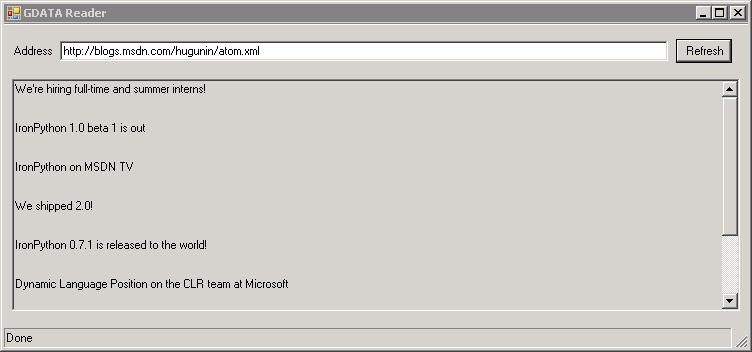
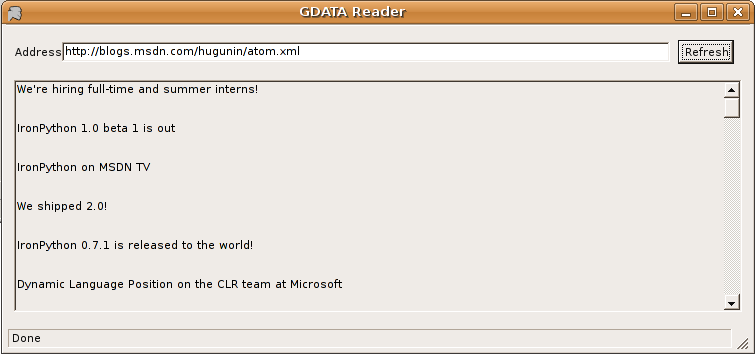
The following screenshot shows the completed GUI displaying the Atom 1.0 feed from Jim Hugunin's blog running under Windows 2003 Terminal Server client (which explains the lack of a XP theme). The Atom feeds from blogs.msdn.com do not have a summary element so our script displays a blank line.
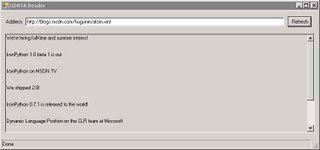
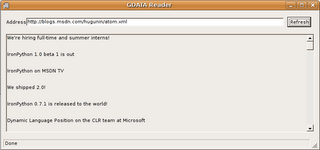
And the next screenshot is the same code running the GUI on Ubuntu 6.06 LTS with Mono 1.1.16.1.
Improving the feed display with a RTF Textbox
Since a GDATA entry contains a link element it would be useful if it was displayed and a user could activate the link to view the entry content in a browser. Some more investigation of the gdata.dll was required to discover how to identify and access the link. The following function does the job for the GDATA reader:
The full source can be found here. The following screenshot shows the completed GUI with RichTextBox displaying the Atom 1.0 feed under Windows 2003 Terminal Server.
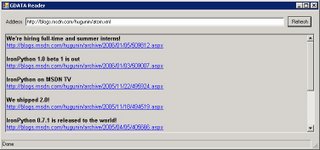
The functionality of the RichTextBox widget with the current Mono version of Windows.Forms means that the text formatting is not the same as .NET and the URL's are displayed but are not clickable. Hopefully this will be fixed soon.
The GUI is missing a couple of features like a top menu and About dialog, maybe that's something for another post.
In the next post we will compile the program into a CLI executable.
The purpose of this post is show how to add a GUI to the simple GDATA reader IronPython script I created in a previous post using System.Windows.Forms. It will not be an in depth discussion on how things work within Windows Forms. For a more detailed introduction to Windows Forms and IronPython, see Michael Foords excellent series of posts.
I suggest you open the source for the complete script in another browser window before continuing.
For the GUI we need a form and on the form, a textbox widget to enter the GDATA URI, a multi-line textbox widget to display the title and summary of each returned feed entry or any errors, a statusbar, and a button to re-fetch the feed.
To the original gdatareader.py script, we add references to the System.Windows.Forms and System.Drawing assemblies and import them.
Next we create a form class called GDataReaderForm.To design the form, I find it's easier to use the GUI Form Designer in Visual Studio 2003/2005 or Visual C# Express. I then copy the generated C# code for the form and with a couple of minutes of search/replace ( this to self, remove those pesky semi-colons and casts) and reformatting, I have the Python code to display my form. This is the _initgui method in the GDataReaderForm class.
Rather than explaining every widget property, I will just point out the things that I had to spend some effort on to get things to work.
- If the form is resized, we want the widgets to scale in relation to the re-sizing, so you need to set the Anchor property.
- If the Enter key is pressed, we want the program to fetch the URI, you need to set the AcceptsReturn property of the URI textbox to false. This means the Enter key with then activate the default button for the form. To make the Refresh button the default button, you need to set the AcceptButton property of the form.
self.AcceptButton = self.gdataRefreshButtonAttached to the Click event of the Refresh button is the method GdataLoadFeed.
self.gdataRefreshButton.Click += self.GdataLoadFeedSo when the Enter key is pressed or the Refresh button clicked, GdataLoadFeed is called, which inturn calls load_feed which finally calls parse the function created in the previous post to fetch and parse a GDATA feed. A list of entries is returned, formatted and displayed in the textbox.
The following screenshot shows the completed GUI displaying the Atom 1.0 feed from Jim Hugunin's blog running under Windows 2003 Terminal Server client (which explains the lack of a XP theme). The Atom feeds from blogs.msdn.com do not have a summary element so our script displays a blank line.
And the next screenshot is the same code running the GUI on Ubuntu 6.06 LTS with Mono 1.1.16.1.
Improving the feed display with a RTF Textbox
Since a GDATA entry contains a link element it would be useful if it was displayed and a user could activate the link to view the entry content in a browser. Some more investigation of the gdata.dll was required to discover how to identify and access the link. The following function does the job for the GDATA reader:
I discovered a RichTextBox widget will detect any urls in it's text if the DetectUrls property is set to true. So the the feed display TextBox was replaced with a RichTextBox, and the formatting function for the entry display replaced with a function that created RTF text. To handle a link being clicked the LinkClick event must have a function assigned to it.
def GetRelatedUri(self, entry, reltype="alternate"):
'''
Get the related uri of reltype from the GDATA entry Links collection.
Returns Uri or None if not found.
'''
uri = None
for link in entry.Links:
    if hasattr(link, "Rel"):
        if link.Rel == reltype:
            uri = link.HRef.Content
    else:
        if reltype == "alternate":
            # No Rel attribute means it's alternate
            uri = link.HRef.Content
    return uri
self.gdataEntriesRichTextBox.LinkClicked += self.LinkClicked
The code for the event handler:
def LinkClicked(self, sender, args):
'''
Get OS to launch the link using associated application
'''
 System.Diagnostics.Process.Start(args.LinkText)
The full source can be found here. The following screenshot shows the completed GUI with RichTextBox displaying the Atom 1.0 feed under Windows 2003 Terminal Server.
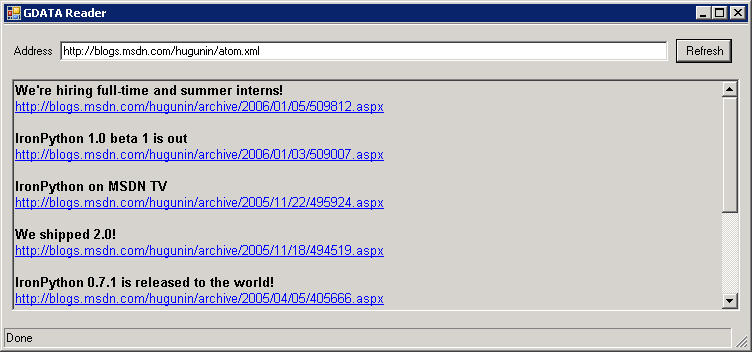
The functionality of the RichTextBox widget with the current Mono version of Windows.Forms means that the text formatting is not the same as .NET and the URL's are displayed but are not clickable. Hopefully this will be fixed soon.
The GUI is missing a couple of features like a top menu and About dialog, maybe that's something for another post.
In the next post we will compile the program into a CLI executable.
Friday, August 11, 2006
My CLI and IronPython Development Environment
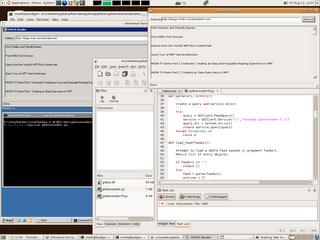
Someone asked me what my preferred development environment for doing CLI and IronPython work is. Since I want to use IronPython to develop cross-platform apps, my operating system is Ubuntu 6.06 LTS Linux running Mono 1.1.16.1. I normally have a couple of versions of IronPython installed, as of today it is 1.0 beta 9 and RC1. For editting I alternate between Vim 6.4 and the MonoDevelop 0.11 editor. To test my IronPython applications under Windows and to do graphical debugging, I either run Windows XP inside VMPlayer or access a Windows Terminal Server using the Linux Terminal Server Client. And of course I have CPython 2.4 installed to compare with the IronPython implementation and access the standard library.

Subscribe to:
Posts (Atom)